01
No account, no cloud, no internet required
Install it and slice. There is no sign-in, no license server to reach and no service the application depends on at run time.

Secure deployments · Air-gapped and offline
For military, defense, aerospace and regulated manufacturing: a slicer that needs no account, no cloud and no internet connection, and a printer controller that computes on the machine. Everything runs inside your facility boundary.
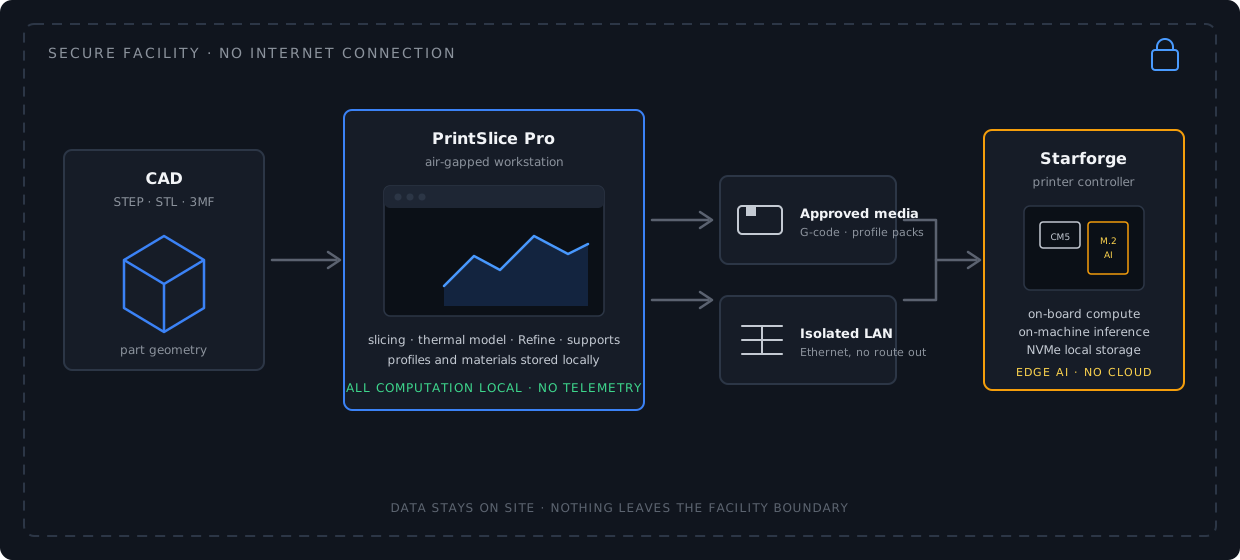
Built for secure facilities
PrintSlice Pro is a desktop application. It does not sign in, it does not talk to a cloud service, and it does not need a network connection to slice. What happens on the workstation stays on the workstation.
Install it and slice. There is no sign-in, no license server to reach and no service the application depends on at run time.
Slicing, the thermal model, Refine recommendations and support generation all run locally, on the cores of the machine in front of you.
Printer profiles, material classes and operations live in the application's own data folder on the workstation, where your policies apply.
The application sends nothing. Crash logs, when they occur, are written to a local file that you decide what to do with.
PrintSlice Pro
The same engine described on the features page, with its thermal model and Refine stage, runs entirely on the local machine. Printer connectivity is optional and, when used, is a local network connection to the printer host only.


Starforge mainboard
The Starforge controller runs the machine from its own compute module and, with V2, runs AI analysis on an onboard accelerator, so print monitoring and adjustment never depend on a cloud connection. It works on an isolated network or standalone.
Deployment
Everything a secure site needs to install and maintain PrintSlice Pro arrives as files you can inspect, approve and carry in.
A complete installer for the workstation. Nothing is downloaded during installation or at run time; updates ship the same way, as full installers.
Installers, profile packs and exported G-code move on the removable media your facility approves, or across an isolated LAN.
Printer and material profiles are files. Validate them once, then distribute them to every workstation on site.
The application ships with its open-source notices and a list of the libraries it includes, for your software review.
Licensing
No internet connection is required to activate or run PrintSlice Pro at a secure site. Talk to us about the option that fits your facility.
Activate on the workstation without a network connection: an activation file is exchanged on approved media.
A hardware-key license that stays with the seat and needs no connection at all.
A floating license served from a host on your own isolated network, for teams that share seats.
Data stays on site
Part geometry, process settings, material data, thermal analysis results and print history are all created and kept inside your boundary.

Secure deployments
Tell us about your facility, your programs and your approval process. We will walk through the offline workflow, licensing options and the Starforge controller with your engineers and your security team.
PrintSlice Pro beta program
The beta program is for engineers and labs printing PEEK, PEKK, PEI and other engineering materials. Members receive early builds as they are cut, talk directly to the engineers who build the slicer, and see their findings shape what gets built next.
What beta members get
Places are limited to what the engineering team can support directly. Signing up registers your interest; we confirm each place by email.
PrintSlice Pro
We have sent you an email with a confirmation link. Click it and you are in.